Change Data Capture SQL Server A Modern Explainer
Discover how Change Data Capture SQL Server works. Learn to set up CDC, query change data, and leverage it for real-time analytics in this complete guide.
Change Data Capture, or CDC, is a built-in feature in SQL Server that does exactly what its name implies: it captures changes. Whenever a row in a user table gets inserted, updated, or deleted, CDC records that activity.
Think of it as a detailed journal for your data. It doesn’t just note that something changed; it records precisely what changed. This journal allows other systems to tap into a stream of these change events almost as they happen. The whole process runs asynchronously by reading the database’s transaction log, which means it barely touches the performance of your production workload.
Why CDC Is a Cornerstone of Modern Data Architecture
Let’s imagine your company’s main database is the central post office for a busy city. In the old days, if another town needed an updated list of all the residents, you’d have to shut down the post office for the night. Then, you’d painstakingly compare today’s complete address book with yesterday’s, just to figure out who moved in or out. This is the world of traditional batch processing—slow, disruptive, and incredibly inefficient.
SQL Server’s Change Data Capture is a much smarter approach. It’s like having a clerk at the post office who simply jots down every change of address form as it comes in. Anyone needing updates can just look at the clerk’s log, without ever interrupting the flow of mail. This is the fundamental shift from taking periodic “snapshots” to consuming a continuous “stream” of events, and it’s what makes modern, responsive applications possible.
The Shift from Batch Processing to Real-Time Streams
The real power of CDC is how it enables real-time data pipelines. We’re moving away from clunky nightly jobs that shuttle stale data around. Instead, CDC facilitates a constant flow of information the moment it’s created. This is a game-changer for a few key reasons:
- Real-Time Analytics: You can feed business intelligence platforms and data warehouses with fresh, up-to-the-minute information. This leads to sharper insights and faster, more confident decision-making.
- Microservices Synchronization: In a distributed architecture, CDC is perfect for keeping data consistent across different services without coupling them tightly together.
- Data Replication and Migration: It’s a fantastic tool for zero-downtime database migrations or for setting up read replicas to balance query loads.
- Audit and Compliance: CDC creates a detailed, unchangeable history of every single data modification, which is invaluable for security audits and meeting regulatory requirements.
Microsoft baked native CDC support right into SQL Server 2008, giving developers a solid way to track data changes without relying on fragile custom triggers or cumbersome auditing tables.
By capturing changes right at the source, CDC turns a static database into a dynamic, event-driven hub. It’s the engine that powers the move from outdated data processing to instant data awareness.
This is the thinking that underpins real-time data streaming, where systems are built to react to events as they unfold. For any business trying to build an event-driven architecture or create a single, unified view of its data, understanding Change Data Capture is no longer just a good idea—it’s essential.
How SQL Server CDC Works Under the Hood
To really get a handle on SQL Server Change Data Capture, you need to peek behind the curtain and see how it works. It’s not just a single feature you flip on; it’s a well-oiled machine with a few key parts working in concert. The whole system is engineered to be efficient and stay out of your way, and it all starts with the database’s most fundamental record: the transaction log.
This diagram lays out the basic flow, from the moment a change is made in your database to when it gets recorded for you to use.
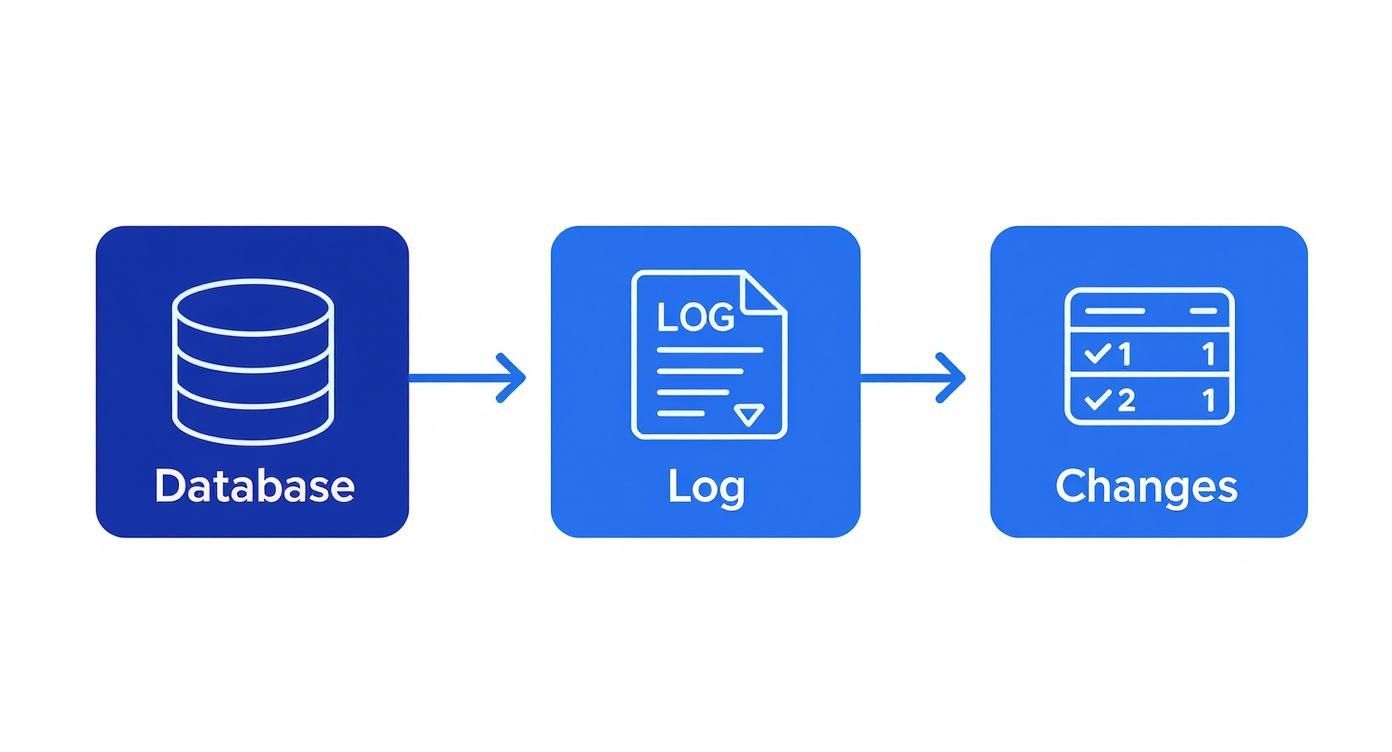
As you can see, every database modification hits the transaction log first. That log then becomes the source for the CDC capture process, which feeds the dedicated change tables.
Let’s break down each of these components to see what they do.
To help you visualize how these pieces fit together, here’s a quick breakdown of the main players in the CDC architecture.
Key Components of SQL Server CDC Architecture
This table breaks down the primary components of the CDC process, their functions, and their interactions within the SQL Server environment.
ComponentPrimary FunctionHow It WorksTransaction LogServes as the raw, unfiltered source of all database changes.SQL Server writes every INSERT, UPDATE, and DELETE here first for recovery and consistency. CDC reads from this log instead of the actual tables.Capture JobScans the transaction log and moves change data into the change tables.This is a SQL Server Agent job that runs continuously, pulling relevant change records from the log and transforming them into a structured historical format.Change TablesStore the historical record of changes for each tracked source table.These are special system tables that mirror the structure of your source table but include extra metadata columns (like the type of operation).Cleanup JobPurges old data from the change tables to manage storage.Another SQL Server Agent job that runs periodically to enforce the data retention policy you’ve set, preventing the change tables from growing indefinitely.
Now, let’s dig a little deeper into the role each one plays.
The Transaction Log: The Unimpeachable Source of Truth
Every single thing that happens to your data—every INSERT, UPDATE, or DELETE—is first written to the transaction log. This isn’t a CDC feature; it’s a core part of how SQL Server guarantees data integrity. CDC just cleverly piggybacks on this existing, rock-solid mechanism.
Instead of hammering your production tables with constant queries to see “what’s new?”, CDC reads the transaction log asynchronously. This is a huge deal. It means CDC doesn’t get in the way of your application’s workload. Think of it like a reporter reading the official court transcript instead of constantly interrupting the trial to ask questions.
The Capture Job: The Diligent Historian
Once you enable CDC on a table, SQL Server automatically creates a capture job. This is simply a SQL Server Agent job that has one purpose: to scan the transaction log for changes made to the tables you’re tracking. This job is the real engine of the CDC process.
When it spots a relevant entry in the log, it pulls out all the important details:
- What happened? (An insert, update, or delete)
- What data was involved?
- What was the commit timestamp for the transaction?
It then neatly packages this information and writes it into a dedicated system table called a change table. Every source table you track gets its own corresponding change table, which becomes a detailed historical ledger of every modification.
The power of features like CDC is a big reason for the platform’s staying power. According to a 2025 analysis, SQL Server 2019 holds the dominant market share at about 43%, a testament to the enterprise demand for its advanced capabilities. You can discover more insights about SQL Server transformation trends to see how the market is evolving.
The Change Tables: A Detailed Historical Record
This is where the real value for your applications lies. The change tables aren’t just lazy copies of your data; they’re meticulously structured to give you a rich, queryable history of changes.
A change table contains all the columns from your original source table, plus a few extra metadata columns. These extra columns are crucial—they tell you the type of operation, the transaction sequence number, and other context, giving you a complete picture of how a single row has changed over time.
So, if a row in your Customers table gets updated twice, you won’t just see the final state. You’ll see two distinct entries in the cdc.dbo_Customers_CT change table, one for each update, showing exactly what that row looked like at each point in time.
The Cleanup Job: The Essential Housekeeper
Of course, you can’t just keep a record of every change forever—you’d run out of disk space pretty quickly. SQL Server knows this, so it also creates a cleanup job when you enable CDC on a database.
This second SQL Server Agent job runs on a schedule to purge old data from the change tables. By default, it keeps three days’ worth of history, but you can easily configure this retention period to fit your needs. This automated housekeeping is what keeps your CDC implementation lean and performant over the long haul.
Real-World Use Cases for CDC

Knowing the architecture behind SQL Server’s Change Data Capture is one thing, but seeing it solve real business problems is where its value truly clicks. CDC isn’t just a clever database feature; it’s the engine behind modern, responsive, and data-driven systems. Its applications stretch from high-speed analytics to complex application design and even critical security compliance.
Let’s dig into a few powerful scenarios where CDC stops being a technical concept and becomes a genuine business advantage.
Enabling Near Real-Time Data Warehousing
We’ve all been there. Traditional data warehouses get updated with slow, clunky batch jobs. These processes usually run overnight, meaning analysts and decision-makers are always looking at data that’s at least a day old. In a fast-moving market, that kind of delay can be a serious handicap.
CDC flips this model on its head. Instead of the old “dump and reload” method, CDC streams just the changes—the new orders, updated customer info, or deleted records—as they happen.
This incremental, real-time approach is a game-changer:
- Fresh Data: Your analytics platforms get fed with data that’s seconds or minutes old, not hours.
- Reduced Load: It avoids hammering the source database with massive batch updates, keeping your production systems happy.
- Efficient Processing: The data warehouse only has to deal with small, manageable chunks of new information, which boosts its own performance.
Think of a large retailer using CDC to stream sales data from its operational SQL Server database straight into a cloud warehouse like BigQuery. They can power live dashboards tracking inventory and sales, making immediate decisions on pricing or stock levels. We explore this topic in-depth in our guide to streaming with change data capture into BigQuery.
Synchronizing Data Across Microservices
In a microservices world, each service typically owns its database. The big challenge is keeping data consistent across these services without creating tight, messy dependencies that undermine the whole point of the architecture.
CDC offers a surprisingly elegant fix. When one service changes its data, CDC captures that event. Other services that care about that change can simply subscribe to the stream and update themselves. This is a classic implementation of the “transactional outbox” pattern.
Picture an e-commerce platform built on microservices:
- The Orders Service writes a new order to its database.
- CDC immediately captures this
INSERTevent. - The Shipping Service sees the event and creates a new shipment record.
- At the same time, the Notifications Service picks up the event and sends an order confirmation email.
Each service reacts on its own, with no direct calls between them. This keeps the whole system decoupled, resilient, and far easier to scale and maintain.
Creating Immutable Audit Trails for Compliance
For many businesses, especially in finance and healthcare, a detailed and tamper-proof audit trail isn’t just a nice-to-have—it’s the law. Regulations like GDPR, SOX, and HIPAA demand a verifiable history of who changed what data, and when.
Because CDC pulls every INSERT, UPDATE, and DELETE directly from the transaction log, it naturally creates a perfect, chronological history of all data modifications. This stream of changes can be sent to a secure, immutable storage system, like a write-once, read-many (WORM) archive.
This is far more reliable than logging at the application level. It captures every single change, regardless of whether it came from the app, a DBA running a direct query, or a stored procedure. The result is a complete and trustworthy record for security audits and regulatory checks.
The demand for this kind of real-time insight is exploding. By 2025, it’s estimated that nearly 30% of all data generated globally will be real-time, fueling massive growth in the data integration market. You can explore more about this trend and other CDC adoption stats on Integrate.io.
How to Enable and Configure CDC Step-by-Step
Getting Change Data Capture up and running in SQL Server is a straightforward, two-part process. You don’t need any fancy third-party tools or complex scripts—it’s all handled with a couple of built-in T-SQL stored procedures. This guide will walk you through the exact commands to get CDC activated on your database and then on the specific tables you want to watch.
First, you’ll switch CDC on for the entire database. This initial step lays the groundwork, creating the system tables and background jobs that make CDC work. After that, you’ll pinpoint the individual tables you want to track. This granular control is great because it ensures you only capture the changes you actually need, keeping performance overhead to a minimum.
The screenshot below from Microsoft’s official documentation gives a great visual of the components that get created behind the scenes.
As you can see, enabling CDC builds out dedicated change tables and SQL Server Agent jobs. These two pieces work in tandem to scan the transaction log and meticulously record the history of your data.
Stage 1: Enable CDC on the Database
Before you can monitor any specific table, you have to flip the main switch for the entire database. This one-time action creates the cdc schema, a few metadata tables, and the all-important SQL Server Agent capture and cleanup jobs we talked about earlier.
Think of it like setting up a new security system for a building. You have to install the central hub and monitoring service before you can start adding sensors to individual doors and windows.
To turn on CDC for your database, you just need to execute the sys.sp_cdc_enable_db stored procedure. Keep in mind, you’ll need sysadmin privileges to do this.
USE YourDatabaseName;GOEXEC sys.sp_cdc_enable_db;GO
Once you run that, you can quickly confirm it worked by checking the is_cdc_enabled column in the sys.databases catalog view.
SELECT name, is_cdc_enabledFROM sys.databasesWHERE name = ‘YourDatabaseName’;
A value of 1 here means you’re good to go—CDC is now active at the database level. You should also see two new jobs pop up under the SQL Server Agent, named something like cdc.YourDatabaseName_capture and cdc.YourDatabaseName_cleanup. It’s absolutely crucial that the SQL Server Agent is running, because CDC completely depends on it.
Of course, if you’re using a managed service like Azure SQL, this is handled for you. For a closer look at the cloud-specific nuances, you can learn more about implementing change data capture in Azure SQL Database and see how it simplifies some of these dependencies.
Stage 2: Enable CDC on Specific Tables
With the database-level foundation in place, it’s time to zero in on the tables you want to monitor. You enable CDC on a table-by-table basis using the sys.sp_cdc_enable_table stored procedure. This targeted approach is a huge benefit, as it stops you from wasting resources capturing changes from tables you don’t care about.
This stored procedure comes with a few key parameters that give you fine-grained control:
@source_schema: The schema your source table lives in (e.g.,N'dbo').@source_name: The name of the table you want to start tracking (e.g.,N'Customers').@role_name: This is a fantastic security feature. It creates a special database role to control who can access the change data. Only members of this role (plussysadminordb_owner) can peek at the change tables. If you set this toNULL, anyone can query the data.@supports_net_changes: Setting this to 1 is really useful. It creates an extra index on the change table and a function that lets you easily query for the “net” changes, giving you the final state of a row after multiple updates.
Here’s what it looks like in practice. We’ll enable CDC on a dbo.Customers table and lock it down with a role called cdc_readers.
EXEC sys.sp_cdc_enable_table@source_schema = N’dbo’,@source_name = N’Customers’,@role_name = N’cdc_readers’,@supports_net_changes = 1;GO
Pro Tip: I always recommend specifying a @role_name when you enable CDC on a table. It’s a critical security best practice that prevents unauthorized users from stumbling upon potentially sensitive historical data in your change tables.
Verifying Your Table-Level Setup
After you’ve enabled CDC for a table, it’s always a good idea to double-check that everything is configured correctly. Just like the database-level check, there’s a handy catalog view for this.
Run this simple query to check the status:
SELECT name, is_tracked_by_cdcFROM sys.tablesWHERE name = ‘Customers’;
If the is_tracked_by_cdc column comes back with a 1, you’re all set. Your table is now officially being monitored. From this point forward, every INSERT, UPDATE, or DELETE will be picked up by the CDC capture job and logged in its corresponding change table (which will be named something like cdc.dbo_Customers_CT). You are now officially capturing a live stream of data changes, ready to be consumed by your downstream applications.
How to Query and Work With Change Data
Once you have Change Data Capture up and running, the real fun begins: actually using the data. CDC tracks every change and neatly tucks it away into special system tables. While you could try to query these tables directly, it’s a bad idea. Instead, SQL Server gives us a clean and reliable way to get the data through a set of powerful table-valued functions.
Think of these functions as a dedicated API for your change data. They handle all the messy internal details, like interpreting the log sequence numbers (LSNs) that CDC uses to keep time. This lets you ask for all changes within a specific timeframe without needing a PhD in SQL Server internals, keeping your queries both simple and correct.
Understanding the Two Main Query Functions
When it comes to pulling change data, SQL Server offers two main tools for the job, each built for a different purpose. Getting the distinction right is key to building an effective data pipeline. The two functions are cdc.fn_cdc_get_all_changes_ and cdc.fn_cdc_get_net_changes_.
It’s a bit like looking at your bank account. The “all changes” function is your full transaction history—every deposit, every withdrawal, every tiny fee, all listed in chronological order. The “net changes” function is more like the final summary at the end of the month, telling you what the balance became without listing every single step it took to get there.
Choosing the right function is a critical decision. all_changes gives you a complete audit trail, perfect for event sourcing or detailed historical analysis. net_changes is ideal for synchronization tasks where you only care about the final state of a row.
Let’s dig a little deeper into what makes them different.
Comparison of CDC Query Functions
Understanding when to use ‘all changes’ versus ‘net changes’ is critical for building efficient data pipelines. This table breaks down the two main CDC query functions to help you see where each one shines.
Query Function TypeUse CaseData ReturnedExample ScenarioAll ChangesYou need to see every single intermediate modification to a row for a complete historical record.Returns one row for each change made to the source table within the specified LSN range. A single row updated three times will appear three times.Building a detailed audit log where you must track not just the final value of a record but every state it went through to get there.Net ChangesYou only care about the final, consolidated state of a row after one or more changes.Returns one row per source row that changed, reflecting its final value. A row updated three times will appear only once with its last state.Synchronizing a data warehouse or a search index where only the current, most up-to-date version of each record matters.
Simply put, use the “all changes” function when the journey is just as important as the destination. For everything else, when you just need to know where things ended up, the “net changes” function is your best bet.
Practical T-SQL Query Examples
Enough theory—let’s see what this looks like with some real T-SQL. For these examples, let’s assume we’ve enabled CDC on a dbo.Products table, which created a capture instance named dbo_Products.
Our first step is always to figure out the LSN range we want to query. A common scenario is grabbing all the changes that happened between yesterday and today.
DECLARE @begin_lsn BINARY(10), @end_lsn BINARY(10);SET @begin_lsn = sys.fn_cdc_map_time_to_lsn(‘smallest greater than’, ‘2023-10-26’);SET @end_lsn = sys.fn_cdc_map_time_to_lsn(‘largest less than or equal’, ‘2023-10-27’);
Once we have our LSN boundaries, we’re ready to query the change data.
Example 1: Getting All Intermediate Changes
This query gives you a complete blow-by-blow of every modification from yesterday. If a single product’s price was updated twice, you’ll get two rows back for that product. The special __$operation column is your guide to what happened: 1 for a delete, 2 for an insert, 3 for the ‘before’ image of an update, and 4 for the ‘after’ image.
SELECT__$operation AS Operation,CASE __$operationWHEN 1 THEN ’Delete’WHEN 2 THEN ’Insert’WHEN 3 THEN ’Update (Old)’WHEN 4 THEN ‘Update (New)’END AS OperationType,ProductID,ProductName,PriceFROM cdc.fn_cdc_get_all_changes_dbo_Products(@begin_lsn, @end_lsn, N’all’);
Example 2: Getting the Final State of Changed Rows
Now for the ‘net changes’ approach. This query summarizes everything that happened yesterday into a single result per row. If a product’s price changed five times, you’ll only get one row back showing its final price at the end of the day. Notice how much simpler the output is—perfect for ETL jobs.
SELECTProductID,ProductName,PriceFROM cdc.fn_cdc_get_net_changes_dbo_Products(@begin_lsn, @end_lsn, N’all’);
Getting comfortable with these functions is the key to unlocking CDC’s true potential. They are the building blocks for creating everything from real-time analytics dashboards to resilient data synchronization systems, all powered by the native Change Data Capture in SQL Server.
So, you’re getting serious about using Change Data Capture in SQL Server. That’s great! But as you get closer, a few practical questions are probably bubbling up. CDC is a fantastic feature, but it’s smart to understand its real-world impact, how it stacks up against other tools, and what you need in place before you flip the switch.
Let’s walk through the most common questions I hear from developers and DBAs when they first start digging into CDC. Getting these answers sorted out now will save you from headaches down the road.
Will Enabling CDC Hurt My Database Performance?
This is always the first question, and for good reason. The last thing anyone wants is to turn on a new feature and watch their production database grind to a halt. The good news? CDC is designed to be incredibly light on its feet.
The whole process is asynchronous. Instead of constantly hitting your source tables, the CDC capture job simply reads the transaction log—something SQL Server is already writing to for its own recovery needs. This means CDC doesn’t add any extra locking or contention to your application’s day-to-day INSERT, UPDATE, and DELETE operations. For your primary workload, the performance hit is almost always minimal.
Of course, nothing is truly “free.” There are a couple of things to keep an eye on:
- Disk Space: Those change tables have to live somewhere, and they will grow. This is exactly why the automated cleanup job is so critical. You’ll need to monitor your disk usage, especially if you’re dealing with a high-transaction system.
- SQL Server Agent: The capture and cleanup jobs use a small amount of CPU and I/O when they run. On a decently-sized server, you’ll likely never even notice it.
In most real-world scenarios, the performance impact from enabling CDC is negligible. Its asynchronous, log-based design does a great job of separating the change tracking work from your live production workload, making it a safe bet for even the busiest systems.
What Is the Difference Between CDC and Change Tracking?
This is another common point of confusion. SQL Server has a similar-sounding feature called Change Tracking (CT), and it’s easy to mix them up. While they both track changes, they operate in completely different ways and are built for very different jobs. Picking the right one really boils down to what you’re trying to achieve.
Here’s a simple analogy:
- Change Tracking is like a security guard who just jots down which rooms had visitors. It tells you
Row 5in theCustomerstable was modified, but that’s it. No more details. - Change Data Capture is the full security camera system, recording everything. It tells you that
Row 5was updated, exactly what the data looked like before, and what it was changed to after.
Let’s break it down in a table:
FeatureWhat It TracksLevel of DetailPrimary Use CaseChange TrackingWhich rows have changed.Very low. Just the primary key of the changed row.Simple, lightweight data synchronization where you only need to know if a row is out of date.Change Data CaptureWhat data has changed.Very high. Full row history, including every intermediate value.Building detailed audit logs, streaming data to a warehouse, or powering event-driven systems.
The bottom line: use Change Tracking when all you need is a “what’s new?” flag. Use Change Data Capture SQL Server when you need the complete story of how your data changed over time.
What Are the Prerequisites for Using CDC?
Before you can fire up CDC, you need to make sure a few things are in order. Getting these prerequisites handled upfront will save you from some common setup errors.
First things first, you need the right edition of SQL Server. CDC isn’t available everywhere; it’s a feature included in the Enterprise, Developer, and Standard editions. If you’re running SQL Server Express, you’re out of luck and won’t be able to use the built-in CDC functionality.
Second, the SQL Server Agent absolutely must be running. This is non-negotiable. CDC is completely dependent on two SQL Server Agent jobs: one to capture the changes and another to clean up the old data. If the agent stops, the process grinds to a halt, your change tables go stale, and your transaction log can start growing uncontrollably.
Finally, you’ll need the right permissions. To enable CDC on a database (sys.sp_cdc_enable_db), you have to be a member of the sysadmin fixed server role. To then enable it on a specific table (sys.sp_cdc_enable_table), you need to be part of the db_owner database role. Making sure you have the right security access from the get-go will make the entire setup process a whole lot smoother.
Ready to move beyond manual CDC configuration and embrace a fully managed, real-time data pipeline? Streamkap uses CDC to stream data from sources like SQL Server to destinations like Snowflake, BigQuery, and Databricks with minimal latency and zero impact on your source systems. Automate schema evolution, handle high volumes, and replace brittle batch ETL jobs with a modern streaming solution.
Related resources
Kafka Consumer Lag: Causes, Debugging, and Fixes
Consumer lag is the most common Kafka operational issue. Learn what causes it, how to measure it, and practical strategies to bring it under control.
Kafka on Kubernetes: Real-World Lessons
Running Kafka on Kubernetes sounds like a good idea until you hit storage, networking, and operational challenges. Here's what teams learn the hard way and how to avoid the common pitfalls.
Backpressure in Stream Processing: What It Is and How to Handle It
Learn what backpressure means in streaming pipelines, how to detect it, and practical strategies for handling it in Kafka, Flink, and CDC pipelines without losing data.