Streaming 400,000 Tables with Streamkap

Paul Dudley
December 16, 2025
TL;DR
• Limble's 400,000+ MariaDB tables broke every traditional ETL tool they tried. • Streamkap collapsed similar tables upstream, cutting ingestion costs by 40x. • Monthly maintenance dropped from 24+ hours to just 2 hours.
Table of Contents
Introduction Who is Limble? What Do They Do? Data at Limble: Types, Flow, and Where Things Get Complicated Why Was This a Problem? The Search for Better Solutions Enter Streamkap: The Solution That Fit Designing the New Data Architecture The Impact: Cost, Maintenance, and Data Democracy Streamkap Architecture at Limble Testing, Onboarding, and Support: Real-World Feedback Scaling Up: What’s Next for Limble? Lessons Learned: Top Takeaways Limble’s Data Stack Before and After Final Thoughts Additional Resources
Introduction
Managing complex data architectures can be a real pain, especially when your company’s growth outpaces the design choices made at the very beginning. This is exactly the story of Limble—a maintenance and asset management company serving thousands of customers—who found themselves wrestling with hundreds of thousands of database tables, ballooning costs, and a never-ending stream of data management headaches.
In this blog post, we’re diving deep into Limble’s journey: their challenges, how they explored different solutions, and the way Streamkap helped them tame their wild data sprawl. We will look into technical details, vendor pain points, and talk about the business side of things.
Who is Limble? What Do They Do?
Solving Real Problems for Maintenance Departments
Limble operates as a maintenance and asset management company. Their goal is to help companies across lots of industries—think hospitals, warehouses, manufacturing shops—keep track of everything in their maintenance departments and to manage the assets that are in their facilities and manufacturing plants.
Most businesses have a maintenance team to manage assets: everything from AC units to forklifts, all the way down to screws and spare parts. Things break, parts need replacement, and tracking all that manually is a recipe for chaos and wasted money.
Limble’s platform is all about:
- Keeping track of parts and assets
- Assigning and tracking work orders
- Allowing maintenance teams to understand what needs to be done, and what’s already been fixed
- Surfacing dashboards with key metrics, like spend and downtime
The number one enemy for these teams? Unplanned downtime. When a machine breaks without warning and the right part isn’t on hand, whole lines can grind to a halt. That gets really expensive, fast.
Limble’s value is in helping customers get ahead of these breakdowns:
- Predicting which parts to keep in stock
- Tracking past failures to spot trends
- Preventing costly surprises
All of this adds up to big savings for Limble’s customers.
Data at Limble: Types, Flow, and Where Things Get Complicated
Their Data Warehouse Setup
Limble’s data landscape is, by most standards, huge. They’re running a Snowflake-based lakehouse, ingesting data from dozens of sources across just about every department—sales, marketing, finance, revenue operations, you name it.
How does this all fit together?
- Raw data is pumped into Snowflake.
- The data then gets transformed and modeled into dimension and fact tables.
- The BI (business intelligence) team—and sometimes engineering—use those cleaned tables for analysis, reporting, and powering what powering data-intensive application features.
- Some data is cleaned and then fed right back into the application, where customers interact with it.
The Not-So-Standard Table Setup
Now, here’s where it gets wild.
Most SaaS products will have a single set of tables (say, assets, users, work_orders) and as time goes on, more records will be added to those tables. Limble, for historical reasons, inherited a very different scheme in MariaDB: they operate by suites of tables. So rather than thousands of records in a handful of tables, Limble has:
- Nearly 400,000 tables.
- And it’s growing; they constantly create a whole new group of tables.
- It’s a core component and it’s hard to replace, so they’re stuck maintaining it for now.
This approach caused a ton of problems, as you can imagine.
Why Was This a Problem?
Issues with Too Many Tables
1. Tools Aren’t Built for This
Most ETL (Extract-Transform-Load) tools simply can’t deal with hundreds of thousands of tables. Either they flat out don’t support it, or the cost becomes astronomical.
2. DIY Data Pipeline Nightmares
Limble initially solved this in-house with a combination of DMS (Database Management Tools), Change Data Capture (CDC), and S3:
- CDC pipeline replicated tables to S3 as parquet files.
- Snowpipe (Snowflake’s ingestion tool) monitored S3 for new files and loaded them in.
Seemed smart… until the bills came in.
3. Cost Explosion
- The data ingestion side (Snowpipe, warehouses, etc.) can easily go up to dozens of thousands of dollars.
- Additional costs on the DMS side.
- Paying for compute on Snowflake, since Snowpipe requires spinning up warehouses for every load.
4. Latency & Maintenance Headaches- Latency was “okay” for internal reporting, but as Limble moved towards more customer-facing analytics, they quickly outgrew the old solution.
- The system broke a lot. Every month, at least a couple dozens of engineering hours were spent on band-aids and backfills.
- Missed data = missed insights = upsetting both internal stakeholders and ultimately the customers.
5. Limited Product Analytics
Without reliable, up-to-date data, product teams couldn’t properly analyze user behavior, see which features were working, or plan improvements.
The Search for Better Solutions
What Was Tried? What Broke Down?- Batch ETL Vendors : Limitations on the scale of supported tables, latency of pipelines and cost : 50,000 tables per connector. Limble’s 400,000+ tables blew right past that. You’d have to manage lots of connectors and users—an operational mess.
- Streaming Vendors: Many vendors responded with “We’ve never heard of this use case.” Most couldn’t handle these table numbers, so conversations ended quickly.
- DIY Approaches: Maintenance was a nightmare. Anytime the pipeline broke, backfills became computationally infeasible (think: queries timing out in Snowflake, full data reloads).
“90% of the time we spoke with a vendor, it was, ‘Let me go speak with a sales engineer. We’ve never heard of this use case before.’ They’d come back and just say, ‘We can’t support this many tables.’” - Casey Lavallee - Data Warehouse Manager, Limble
Solutions Considered vs. Their Limits
| Solution | Max Supported Tables | Major Blocker |
|---|---|---|
| In-house DMS + CDC + S3 + Snowpipe | Unlimited | Cost, maintenance, slow backfills |
| Batch ETL Vendors | 50,000/connector | Hit table limits, too costly, unmanageable connector sprawl |
| Streaming Platforms | Varies | Could not support or had never seen use case at this table scale |
| Streamkap | Flexible | No blockers, supported 400K+ tables, managed transformation/aggregation up front |
Enter Streamkap: The Solution That Fit
“No one else [except Streamkap] up to this point had been able to do those two things (handle all the tables, and do up-front aggregation), at least for the cost we were looking for.” - Casey Lavallee - Data Warehouse Manager, Limble
The Decision Process: Who Was Involved?- Day Warehouse Manager: Project lead, hands-on with the data warehouse and internal reporting.
- Staff Database Engineer: Working closely with MariaDB’s daily reality.
- VP of Engineering.
Basically, everyone with a hand in Limble’s data architecture had to weigh in.
Designing the New Data Architecture
The Two Main Data Flows1. Direct Application Usage
- Most data goes straight into the application (web/mobile), surfacing assets, assigning work, updating records in real time for users.
- All the nuts and bolts that keep maintenance teams moving.
2. Analytics and Reporting (Snowflake)
- Data lands in Snowflake via Streamkap.
- Limble’s reporting and product analytics run here.
- Some metrics are sent to Salesforce (for the sales teams to view customer usage).
- Most of Snowflake use is internal—product analytics rather than customer-facing dashboards (for now).
The Why and How of Table Collapsing
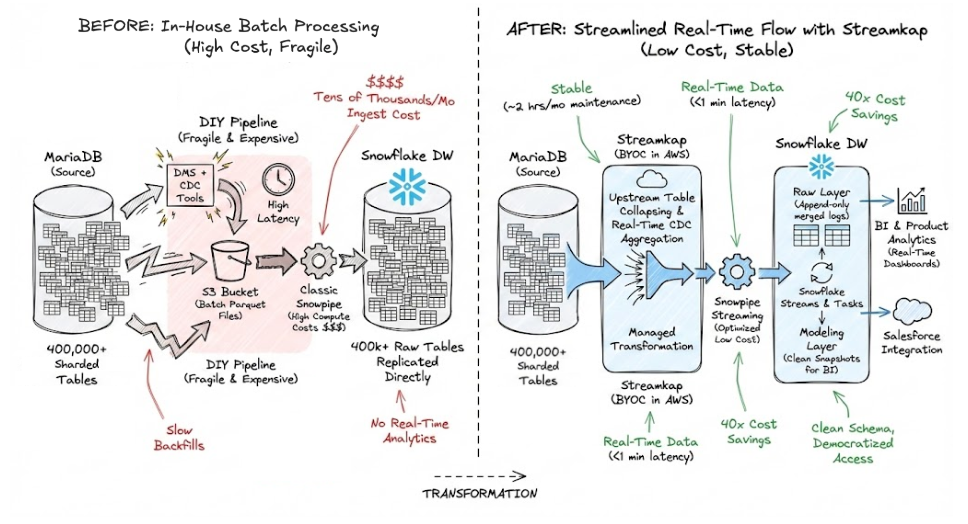
A crucial Streamkap feature for Limble was collapsing the huge list of similar tables down into one in Snowflake.
- No ingesting hundreds of thousands of tables into Snowflake!
- Instead, Streamkap identifies all tables with the same name and merges them, keeping things tidy and fast.
“One thing we wanted to avoid was moving the architecture from our MariaDB into Snowflake. We needed the transformations to happen in the tool that we were using because we wanted to avoid having hundreds of thousands of tables inside of Snowflake.”
The Impact: Cost, Maintenance, and Data Democracy
Maintenance Hours: Dramatic ReductionBefore Streamkap:
- Two engineers (one for Snowflake, one for DMs), each spending 12+ hours/month firefighting.
- Had to be senior, highly specialized team members because everything broke easily.
After Streamkap:
- Down to about 2 hours/month.
- Can be managed by more junior, less specialized staff.
- Team can open up this work to more people: “democratizing” who can manage the data flows and reporting.
Cost: 40x Savings
- Leveraged Snowpipe Streaming (instead of classic Snowpipe/warehouse compute).
- Ingestion costs alone dropped by at least 40 times.
“Now leveraging Snowpipe Streaming, our cost has decreased like 40x. So it’s been a huge cost [saving] as well.”
Latency: Real-Time Analytics Possible
- The old system was good enough for batch updates, but modern apps need close-to-real-time metrics.
- Streamkap made it possible for future customer-facing dashboards to show things like usage logs and product events almost instantly.
Improved Internal Product Analytics
- With a stable, up-to-date data pipeline, Limble’s product teams can finally do real product analytics: user engagement, feature adoption, and more.
- Before, unreliable pipelines made these insights impossible.
Streamkap Architecture at Limble
Setup: BYOC vs. SaaS
Limble decided on the BYOC (Bring Your Own Cloud) deployment model for Streamkap, as opposed to using Streamkap Cloud.
Main decision factor: Security. Having everything inside Limble’s own AWS was crucial and made the team feel way more comfortable.
“We felt more comfortable deploying it in our own cloud infrastructure and owning the setup there as opposed to just having Streamkap host for us.”
Setting it up was straightforward: it took less time than they expected.
Architecture Flow
- Data from MariaDB Tables
- Working with every set of tables, e.g. assets_A, assets_B, etc.
- Streamkap BYOC Instance
- Deployed inside Limble’s AWS, close to their sources.
- Collapses same-named tables into common “append-only” raw tables.
- Append-Only Raw Layer in Snowflake
- All CDC updates stored as logs, preserving the full history.
- Processing Streams/Tasks
- Streams monitor raw tables; tasks update “intermediate” tables with up-to-date snapshots.
- BI/Product/Reporting
- Downstream reporting, analytics, and customer-facing views are powered from these transformed tables.
- Salesforce Integration
- Aggregated metrics are piped to Salesforce for the sales team.
Diagram: End-to-End Data Flow With Streamkap
Sample Table Transformation Pseudocode
The real work here is handled by Streamkap configuration interface, not hand-written code.
Testing, Onboarding, and Support: Real-World Feedback
The Rollout
- Started with a small subset of tables (around 3,000 asset tables) to confirm that merging and latency worked as required.
- Deployed first in a dev environment—both in AWS and Snowflake.
- Compared data between Streamkap and the existing MariaDB read replica to check for accuracy and latency.
They focused on two key success criteria:
- Can we collapse these identical tables into a single table on the destination?
- Is latency low enough to be useful for future real-time use cases?
If both boxes checked out (which they did), the full rollout was greenlit.
Onboarding Experience
- Overall, the onboarding process was really positive.
- Some documentation was still a work-in-progress (as you’d expect from a young company).
- The support team was available at all hours—even across time zones—and always quick to help.
“The support has been 10 out of 10, always online.”
Table Transformation: Upstream, Not in the Warehouse
A huge win with Streamkap: moving the collapsing/aggregation logic upstream, instead of trying to manage thousands of tables inside Snowflake.
- Avoided messy warehouse-side hacks or cost-heavy queries.
- Kept Snowflake schemas clean and manageable.
- Makes eventual migration away from customer-sharded tables much easier.
Scaling Up: What’s Next for Limble?
- Limble plans to deploy Streamkap in multiple geographies (Canada, EU)
- Expansion Streamkap data pipelines to additional destinations (e.g. search databases) to improve application performance and power new features
- Infrastructure-as-Code and API Access: Right now, because of the ease, deployment is a bit more manual, but as Streamkap usage grows, Limble is getting closer to use infrastructure-as-code and API-driven deployments.
Lessons Learned: Top Takeaways
1. Data Architecture Choices Stick With You
Even if Limble didn’t design the unique table sharding, the team is responsible for dealing with it. Migrating off takes real time and care.
2. Cost and Maintenance Are as Critical as Features
A “solution” that works but eats time and money at an unsustainable rate isn’t really a solution.
3. Upfront Transformations Beat Warehouse Sprawl
By aggregating tables upstream, you keep the data warehouse manageable and workflows clean.
4. Vendor Support Matters
Fast, reliable support delivered by real people—especially in a company’s early stages—can make all the difference.
5. Scalability Isn’t Just About Data Volume—It’s About Design
Most vendors, even big names, have limits. Always probe those limits before going all in.
Limble’s Data Stack Before and After
| Before | After (With Streamkap) | |
|---|---|---|
| Pipeline | DM/CDC > S3 > Snowpipe | MariaDB > Streamkap > Snowflake |
| Monthly Ingest Cost | Tens of thousands of $ | ~40x lower |
| Maintenance Hours | 2 engineers, 24+ hrs/month | 2 hrs/month |
| Real-Time Analytics | No | Yes |
| Internal Access | Only senior, specialized | Open to more of the team |
Final Thoughts
Limble’s journey is a great real-world example of why tech debt isn’t just academic—it impacts costs, reliability, and your ability to serve customers fast. By partnering with Streamkap, they took control of their legacy structure, cut costs, and set themselves up for a more scalable, modern future.
If you’re facing data warehouse sprawl, impossible backfills, or hitting the limits of out-of-the-box ETL tools, it may be time to think differently—maybe even upstream.
Got comments or want to share your own war stories about scaling data infrastructure? Drop us a message!
Additional Resources
Thanks for reading! If you want to see more deep dives like this, let us know.
Paul Dudley
LinkedInAuthor Bio
Paul is the CEO and Co-Founder of Streamkap
Published
December 16, 2025
TL;DR
• Limble's 400,000+ MariaDB tables broke every traditional ETL tool they tried. • Streamkap collapsed similar tables upstream, cutting ingestion costs by 40x. • Monthly maintenance dropped from 24+ hours to just 2 hours.
Related blog posts
Case Study: InHire Powers Real-Time AI Recruitment with Streamkap
How a Brazilian ATS leader InHire solved a data crisis in three weeks and built a cutting-edge, real-time AI platform without a single data engineer.
Streamkap Enables Fleetio to Ditch Weekend Data Maintenance for Reliable, Real-Time Streaming
Find out how Streamkap enabled a leading fleet management software company to make the switch from batch processing to real-time streaming data.
How Streamkap Reduced Niche.com's Data Latency from 24 Hours to Near Real-Time
Streamkap helped Niche.com reduce their data latency by 95%, slash their data infrastructure costs, and transition from moving limited data to their entire set in less than a day of implementation.