<--- Back to all resources
What Is Snowflake Marketplace Capacity Drawdown Explained
What is Snowflake Marketplace Capacity Drawdown? This guide explains how it works, its benefits, and how to manage costs to maximize your Snowflake investment.

Snowflake’s Marketplace Capacity Drawdown program is a clever way to let you use your pre-committed Snowflake spending to buy third-party data and applications. It’s almost like having a prepaid debit card for the Snowflake Marketplace, turning what was once a long, drawn-out procurement process into just a few clicks.
Getting More from Your Existing Budget
Let’s think about how things used to work. If your data team needed a new dataset or wanted to try a powerful Snowflake Native App, they had to kick off a whole separate procurement cycle. That meant getting budget approval, negotiating contracts, and onboarding a brand-new vendor. This entire ordeal could easily take months, bringing critical projects to a screeching halt.
The Marketplace Capacity Drawdown (MCD) program completely changes that game. It’s specifically built for Snowflake customers who already have a capacity contract—meaning they’ve committed to spending a certain amount on Snowflake credits over a given period.
Simplifying Procurement and Accelerating Innovation
Instead of treating Marketplace purchases as a new, separate expense, the MCD program lets you draw directly from this existing financial commitment. The cost of the data or application is simply converted into an equivalent amount of Snowflake credits and subtracted from your balance.
This model simplifies billing and removes a massive amount of friction for data teams. It gives them the power to get the tools and data they need right now, not weeks or months down the line.
This approach brings some immediate and obvious wins:
- Faster Access: Your data teams can instantly buy and deploy new resources.
- Budget Consolidation: All your data-related spending is rolled up under a single Snowflake agreement.
- Simplified Vendor Management: Snowflake deals with paying the third-party provider, which means less administrative headache for you.
Launched around August 2023, the program is all about helping customers get more value from their Snowflake investment by avoiding those traditional procurement roadblocks.
What This Means For Your Team
For your data engineers and analysts, this means less time waiting on paperwork and more time building and innovating. For your finance and procurement folks, it translates to fewer contracts to juggle and much clearer visibility into data spending.
Many businesses are finding this program helps them get the absolute most out of their Snowflake investment. The ability to use committed funds for apps that make the platform even better, like real-time data ingestion tools, is a huge advantage. It’s why many leading solutions are now available on the Snowflake Marketplace, and you can explore how Streamkap is now available on it.
To break it down even further, here’s a quick summary of the core components.
Snowflake MCD At a Glance
| Component | Description |
|---|---|
| Eligibility | You must have an active Snowflake capacity contract (pre-committed spend). |
| Mechanism | Purchases are converted to Snowflake credits and deducted from your committed balance. |
| Available Products | Includes third-party datasets and Snowflake Native Apps listed on the Marketplace. |
| Key Benefit | Bypasses traditional procurement cycles for faster access to tools and data. |
| Billing | All transactions are consolidated into your existing Snowflake invoice. |
Ultimately, this program makes your committed spend more flexible and lets your team act on new opportunities instantly.
How Capacity Drawdown Works for Your Budget and Team
The Snowflake Marketplace Capacity Drawdown program is a clever way to bridge the gap between your existing Snowflake financial commitment and the tools your teams need from the Marketplace. It’s designed to make acquiring data and apps incredibly simple, removing the usual red tape without adding new costs.
What It Means for Your Budget
From a financial standpoint, this is all about efficiency. There are no extra fees to use the drawdown program; it just gives you a new way to spend your prepaid Snowflake capacity.
Picture your committed Snowflake spend as a large bucket of funds. You’re already using it for things like compute and storage. The drawdown program simply lets you use that very same bucket to pay for Marketplace purchases.
Behind the scenes, Snowflake handles the entire transaction. They pay the third-party provider for you, then subtract the equivalent value from your Snowflake credit balance. This rolls all your data-related spending onto a single Snowflake invoice, which is a huge win for simplifying vendor management and budget tracking.
The Technical Path to Acquiring New Tools
For your technical team, the process feels almost like magic. A data engineer can find a dataset or a Snowflake Native App they need and get access to it instantly, all by using the organization’s existing capacity.
Here’s what that looks like in practice:
- Discover and Select: A user finds a product on the Marketplace that solves their problem, like a real-time data provider or a data quality tool.
- Initiate Purchase: Instead of kicking off a lengthy procurement cycle, they simply click to acquire the product using the available capacity credits.
- Instant Access: The product shows up in their Snowflake environment almost immediately. A new dataset is ready to be queried, or a Native App is ready to go.
This self-serve model lets teams solve problems right when they happen, not months down the line. When your team can move faster, you get more value from your investment. Finding ways of boosting engineering productivity is a great strategy to maximize the resources you already have.
The key takeaway is this: Marketplace purchases are treated just like any other form of consumption. Whether your team runs a complex query or acquires a new app, the cost is simply deducted from your prepaid credit balance.
Who Is Eligible for the Program
It’s important to know that this program isn’t open to everyone. Your eligibility depends entirely on your Snowflake contract.
The drawdown program is specifically for customers on a capacity-based contract—meaning you’ve prepaid for a certain amount of Snowflake usage over a set term.
It is not available for On-Demand or pay-as-you-go accounts. The whole model is built on “drawing down” from a pool of prepaid funds, which on-demand customers don’t have. This structure gives Snowflake and its partners a predictable financial foundation to build on.
The Strategic Business Benefits of Using Capacity Drawdown
Using the Snowflake Marketplace Capacity Drawdown program is more than just a convenience—it’s a smart business move that directly boosts your company’s agility and financial efficiency. The biggest win? It completely overhauls procurement, changing the game for how your teams get their hands on the data and tools they need to succeed.
This program cuts through the red tape, turning what used to be a drawn-out, multi-month vendor negotiation into something that feels almost instant. Forget the endless contract reviews and budget approval cycles. Your data scientists and analysts can now grab critical resources with just a few clicks, collapsing project timelines and speeding up your entire innovation pipeline.
Fast-Track to Innovation and Insights
Picture the old way of doing things: a data team spots a need, they file a procurement request, and then the waiting game begins. Legal has to review it, finance has to approve it, and then you’re stuck waiting on vendor onboarding. All this friction can easily stall projects for months, meaning you miss out on timely insights and market opportunities.
With capacity drawdown, that entire painful process gets tossed out the window. A team can find a valuable dataset or a powerful Snowflake Native App and have it up and running in their environment that very same day. That kind of speed is a massive competitive advantage.
By tearing down the barriers to acquiring new tools and data, you’re really giving your teams room to experiment, iterate, and deliver value faster. The focus shifts from jumping through administrative hoops to actually solving business problems.
This flowchart shows just how simple the new approach is, from finding what you need to putting it to work.
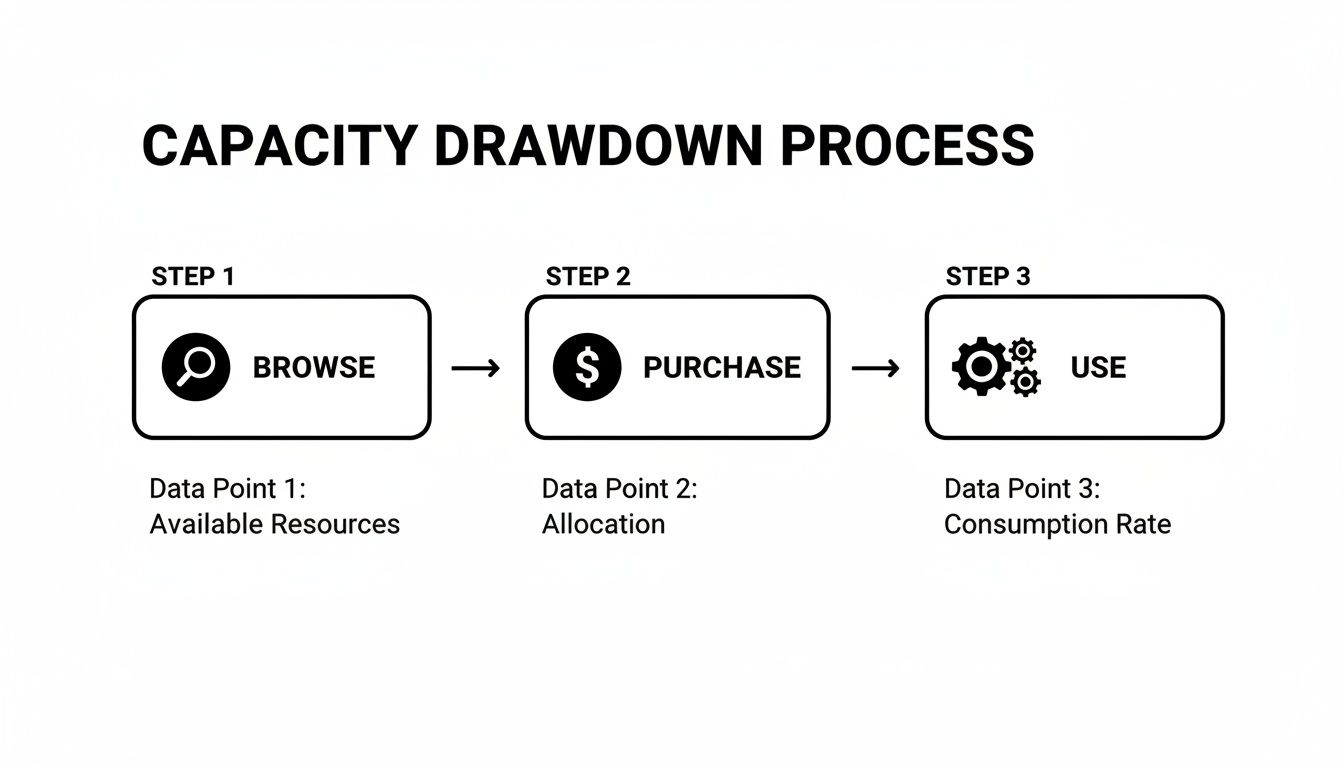
This straightforward Browse, Purchase, Use model gets right to the heart of the program’s value: turning procurement from a roadblock into a smooth part of your data workflow.
Consolidating Budgets and Maximizing Spend
Beyond just moving faster, the program delivers some serious financial perks by centralizing all your data-related spending. Every purchase you make on the Marketplace funnels through your single, pre-existing Snowflake contract. This gives you a crystal-clear view and tight control over what you’re spending and where it’s going.
It’s a fantastic way to turn lengthy vendor onboarding into a simple budget reallocation. A portion of your committed Snowflake capacity is set aside for Marketplace listings, allowing for instant purchases without chasing down new budget approvals. You’re essentially using money you’ve already committed.
This unified approach brings a few key advantages to the table:
- Eliminates Rogue Spending: It puts an end to teams swiping company credit cards for unapproved data or software tools.
- Maximizes Committed Spend: It helps you get the full value out of your Snowflake commitment, turning what could have been “shelf-ware” into genuinely useful assets.
- Reduces Procurement Overhead: Your finance and legal teams are freed up from managing dozens of small, individual vendor contracts.
For example, grabbing a real-time CDC tool from the Marketplace means you can use your committed spend on a solution that makes your entire Snowflake investment more powerful. As you get started, it’s worth learning about streaming data to Snowflake using Snowpipe Streaming and Dynamic Tables to save money to maximize that efficiency.
Monitoring and Managing Your Drawdown Spend
Once you’ve committed to the Snowflake Marketplace capacity drawdown program, the last thing you want is a surprise bill at the end of the month. This is where proactive monitoring becomes your best friend. It’s not just about checking in now and then; it’s about having a real-time pulse on your spending to keep your budget under control. Thankfully, Snowflake gives you everything you need to do this right inside the platform.
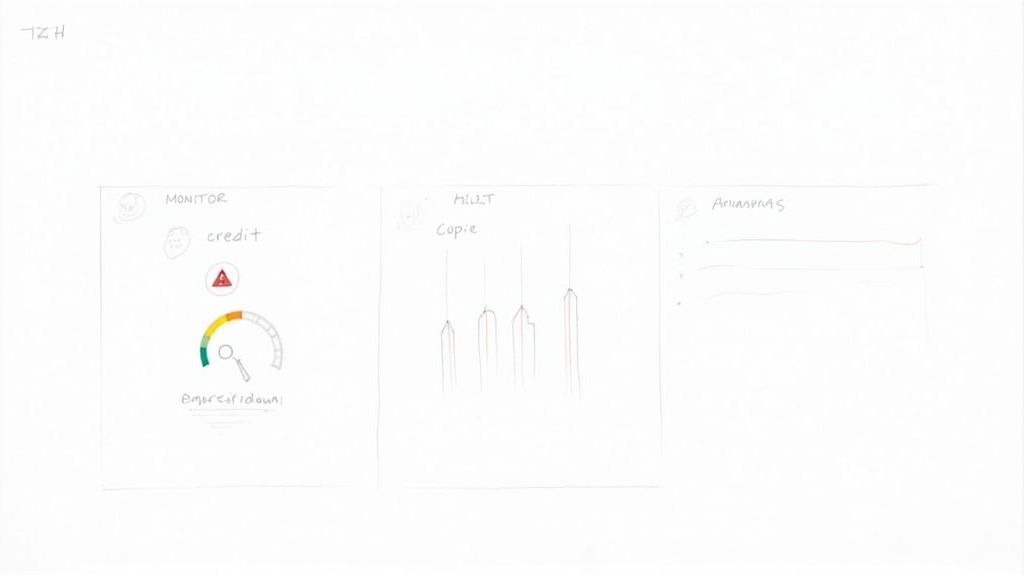
The best way to see what’s happening is by querying Snowflake’s Account Usage views. Think of these as your detailed financial statements, breaking down exactly how your pre-paid capacity is being spent, including which Marketplace listings are using it.
Using Account Usage Views to Track Spend
To really dig in, you’ll want to get comfortable with a few key views that hold all the financial details. They act as a ledger, showing precisely where every credit is going.
With a few simple SQL queries, you can start answering the really important questions:
- Which Marketplace products are costing us the most?
- How much capacity did the marketing analytics project burn through this month?
- Is our drawdown rate speeding up, or is it holding steady?
Think of these Account Usage views as the raw ingredients for your financial dashboard. By querying them, you can cook up custom reports and alerts that give you total control over your Marketplace spending. You’ll always know exactly where your budget stands.
This kind of granular tracking is a core principle in the broader practice of optimizing software licenses, where understanding usage is key to controlling costs.
Setting Up Governance and Automated Alerts
Just watching the numbers isn’t enough—you need to turn that data into action. This is where governance comes in. Snowflake lets you set up resource monitors and automated alerts to catch potential budget overruns before they snowball into a real problem.
Here are a few essential practices you should put in place right away:
- Establish Resource Monitors for Warehouses: Set up monitors to send alerts or even suspend a warehouse when it gets close to a specific credit limit. This is your first line of defense against a runaway query that’s chewing through credits on a large Marketplace dataset.
- Set Up Email Notifications: Configure alerts to ping key people—like the finance team or project leads—when you hit certain thresholds, maybe at 75% and 90% of the monthly budget.
- Attribute Costs with Tags: Use Snowflake’s tagging feature to label costs by team, project, or cost center. This makes it a whole lot easier to slice and dice your Account Usage data and see who’s spending what.
When you pair direct monitoring with automated governance, you build a powerful system for managing your Snowflake capacity drawdown. Your teams get the data they need, and the business avoids nasty financial surprises. For more tips on keeping costs in check, take a look at our guide on optimizing Snowflake for lower costs with the Snowpipe Streaming API.
How to Avoid Common Drawdown Cost Surprises
Using your Snowflake Marketplace capacity drawdown is a fantastic way to get your hands on valuable data and apps, but it’s also surprisingly easy to get blindsided by costs. When credits start disappearing faster than expected, it’s usually due to a few common culprits. Pinpointing these can turn a potential budget nightmare back into the convenient feature it was meant to be.
One of the biggest offenders is running inefficient queries against huge third-party datasets. Seriously, a single poorly written query can chew through terabytes of data and burn a scary amount of credits in just a few minutes. Another classic mistake is the “set it and forget it” approach to auto-refreshing data shares, which can create a slow, silent bleed of compute costs that really add up.
Pinpointing Common Cost Culprits
It’s also worth keeping a close eye on resource-hungry Snowflake Native Apps. These applications are often incredibly powerful, but that power comes from compute resources. If you don’t understand an app’s operational footprint before you deploy it, you could be in for a shock, especially during initial setup or periods of heavy use.
And then there are real-time Change Data Capture (CDC) platforms. Tools like Streamkap are great for getting fresh data, but they need to be configured thoughtfully. By their very nature, they continuously ingest data, which uses compute. Without the right optimizations, those constant micro-transactions can accumulate into a significant expense, quietly draining your prepaid capacity.
A common mistake is treating Marketplace products as “free” after the initial purchase. The reality is that every query, every refresh, and every data load against these products consumes your Snowflake credits and chips away at your capacity drawdown.
To keep your spending predictable, you need to be proactive. This isn’t about avoiding the Marketplace; it’s about being smart with how you use it—from the way you write queries to how you schedule your data updates.
Mitigation Tactics for Predictable Spending
The secret is to treat Marketplace resources with the same financial discipline you apply to your own data warehouses. A great first step is to establish clear best practices for anyone in your organization who accesses third-party data or apps.
True cost control comes from having good visibility and firm guardrails. Here are a few practical strategies you can implement right away:
- Optimize Your Queries: Always, always use
WHEREclauses to narrow down the data you’re scanning in third-party tables. Never runSELECT *on a massive dataset unless you absolutely have to. - Set Smart Refresh Schedules: When using live data shares, pick a refresh frequency that actually matches your business needs. Not everything needs to be updated every single minute.
- Follow Data Ingestion Best Practices: If you’re using a tool like Streamkap, tune it to batch small, frequent updates into larger, more efficient micro-batches. This simple change can dramatically cut down on overhead.
- Use Resource Monitors: Dedicate specific virtual warehouses to your Marketplace workloads. Then, apply resource monitors to cap spending and trigger alerts when you’re approaching your set limits.
By putting these simple controls in place, you can stop common issues from snowballing into major budget blowouts. It’s all about being intentional.
To make it even clearer, this troubleshooting table breaks down the most frequent problems we see and how to solve them.
Common Drawdown Issues and How to Fix Them
| Common Cause | Description | Mitigation Strategy |
|---|---|---|
| Inefficient Queries | Running broad queries that scan entire third-party tables, consuming massive amounts of compute. | Enforce query best practices, use WHERE clauses, and consider materializing frequently accessed subsets of data. |
| Aggressive Auto-Refresh | Setting data shares to refresh more frequently than necessary, leading to constant background compute costs. | Align the refresh schedule with actual business requirements; not every dataset needs real-time updates. |
| Unmonitored Native Apps | Deploying a powerful app without understanding or tracking its underlying compute consumption. | Isolate the app in its own warehouse, apply a resource monitor, and regularly review its usage. |
| Sub-Optimal CDC | Using real-time ingestion tools with overly small, high-frequency loads that create excessive overhead. | Tune your CDC platform to use efficient micro-batching, balancing latency needs with compute costs. |
Ultimately, a little bit of planning and active management goes a long way. By treating Marketplace resources with the same care as your own, you can enjoy all the benefits without the budget anxiety.
Answering Your Top Questions About Snowflake’s MCD
Jumping into a program like the Snowflake Marketplace Capacity Drawdown is bound to bring up a few questions. Let’s clear up some of the most common ones so you can move forward with confidence.
Does It Cost Extra to Use the Snowflake Capacity Drawdown Program?
Nope. There are no additional fees or costs to use the MCD program. It’s simply a different way to spend the money you’ve already committed to Snowflake. Think of it this way: the cost of a Marketplace product is just another line item that gets deducted from your prepaid balance, exactly like your warehouse compute usage.
Is the Capacity Drawdown Program Open to All Snowflake Customers?
Not quite. This program is specifically for customers on a capacity-based (pre-committed) contract. It isn’t available for On-Demand accounts or those billed monthly. The program also has some restrictions for government-specific regions. The best way to confirm your eligibility is to chat with your Snowflake account team, especially around contract renewal or amendment time.
The whole point of the program is to “draw down” from a prepaid pool. That’s why it’s only open to customers who’ve already committed to a certain level of spend with Snowflake.
How Can I See How Much Capacity Marketplace Products Are Using?
You can keep a close eye on this directly within Snowflake. Your best bet is to query the Account Usage views, particularly tables like MARKETPLACE_PAID_USAGE_DAILY_V. These views give you a granular breakdown of credit consumption by each Marketplace listing, making it easy to see exactly where your money is going. A lot of teams find it helpful to build a simple dashboard on top of this data for a quick visual check-in.
What If My Marketplace Usage Pushes Me Over My Committed Capacity?
Good question. If your total consumption (your regular compute plus your Marketplace purchases) goes beyond your prepaid capacity, the overage is billed at your standard on-demand rate. This rate is defined in your Snowflake contract. This is precisely why it’s so important to monitor your usage proactively and set up resource monitors to prevent any surprise charges at the end of the month.
Ready to stop wrestling with complex data pipelines and get real-time insights? Streamkap delivers a powerful and efficient Change Data Capture (CDC) solution, now available on the Snowflake Marketplace. You can start streaming data in minutes, not months, and see firsthand how our platform can significantly lower your total cost of ownership. Explore Streamkap today at https://streamkap.com.